Showing posts with label Intelligence Community. Show all posts

Wednesday, April 28, 2010

Reaction to the PowerPoint fiasco

Everyone is reacting with glee about the Afghanitan PowerPoint flag. Here's the thing though - PowerPoint isn't really evil, it's the people who use it. I can make slides just as pretty and impressive as Steve Jobs does in PowerPoint (he obviously doesn't use that tool, he uses Keynote). The tool doesn't make you use bullet points, it's just an option.

And I even wrote a post titled "Why I hate PowerPoint and the people who love it"!!!

Here's what happened basically the first time I came up with a presentation on while working with a DOD client:

  • Chris makes really cool looking slides that aren't a bazillion acronyms and bullet points, but instead uses images and graphics
  • Chris presents to his projects senior-level board to get approval to take it to customer (very normal practice, for quality control and coordination throughout the project which was 500+ people)
  • Board VOMITS on Chris, telling him he basically needs to go write a 12 page report, then copy/paste it into PowerPoint
  • Chris reworks presentation to contain all bullet points, but that often times have 2+ sentences within each bullet (thereby making it not a real bullet point)
  • Board loves presentation
  • Client likes (though not loves) presentation
  • Chris now forced to do all presentations as copy/paste exercises from Word
The problem is you make nice fancy slides like what Steve Jobs does, then people print them out or read them without you around, and they make no sense (try finding an old Steve Jobs presentation and figuring out what he meant, impossible!)


As some of the good articles reviewing the issue point out, it's really the interrelation between three elements: read ahead materials, the presentation, and leave behind materials.

Note: If you've heard the Kinko's commercial where the people keep patting the guy on the back for his leave behinds, it always makes me chuckle and think of this.


One review said using PowerPoint for really important, information-driven presentations is like like using PowerPoint to make a case before the Supreme Court. Aside from being a great sound byte and a zinger, it's a totally stupid point. You'd used Word to submit your brief to the SC, and PowerPoint to present information during the trial. So the argument that person (can't recall the name) is rather silly.


Instead of making all the ridiculous presentations do, they should send information ahead of time (the Times mentions how DefSec Gates wants slides the day before, which is highly common; instead of slides they should send a Word document as an overview, that is structured to correspond to the presentation the next day). The read ahead obviously prefaces the presentation, provides background information in case the person needs it, etc. Then you present with your less convoluted slides that are less bullet point and word oriented, and use more visuals. And THEN you give them something they can keep and pass around on their own.


When I have done this in the past, it is obviously a LOT more work, but I will give them a leave behind that includes the presentation and read ahead, so they've got it all in one bunch. I also make sure to control and restrict access to digital copies of files, and give them my bundled leave behind set.


Lots of fun.


All that being said, I have seen dozens of slides similar to, though not as complex, as the one that got all this started. It's totally ridiculous on its own, but I'd to know what came before and after it, as well as what the person was saying. If they were using the slide to make the point of "things are really fragged up because the relationships are so complex", then it is actually an A+ chart because it rather convincingly makes that point.

Wednesday, April 7, 2010

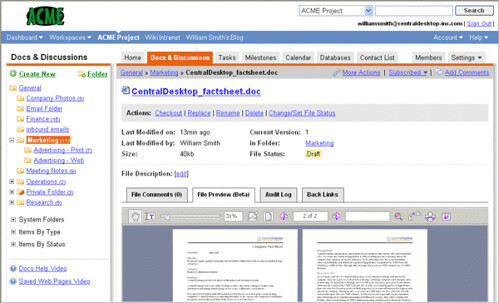
Using Central Desktop for proposals

new_logo_cd.gif


Central Desktop is the online collaboration tool of choice for my employer (recently named one of Consulting Magazine’s “Small Jewels” for 2010).


In addition to the various success stories they have, here are several ways I recommend using Central Desktop for proposals:
  • Create milestones for deliverables with tasks for individual steps like outlines and reviews etc. This will help create your project deadline structure within the tool, the workspace calendar will then be populated with schedule data as well.

  • You can post templates for various sections and components of the proposal. This could be for win themes, storyboards, or actual content.
  • The built-in version control will be CRUCIAL in your management of sections. Not only can it manage all the various versions of documents through a logical and simple check out/in process, you can also provide summary comments to the versions of the documents so you know what was changed, when and by whom.
  • You can also provide comments on documents as part of an overall discussion of the content. This is great to pull dialog out of emails and onto a system so it is referenceable later (no more debates about who suggested to remove a section)
  • Also instead of emails there is a forum for online discussions. These are great when you are in the idea creation / brainstorming phase, and won't require you to post a formal "possible win themes" document
  • You can post Twitter-like messages so people know who is actively working on what, which is rather useful when you have a decentralized team concurrently writing and editing material.

Central Desktop was not developed as a proposal tool, but does a fantastic job as one. You should explore their tiered product offering, I think you'll find the prices rather reasonable.

Tip: If you get a plan with a limited number of "internal" users, there are creative ways to use the "external" accounts ;-)


Overall you’ll need to decide if each proposal warrants its own workspace, if you should create a workspace just for proposals, or if you want to use a dedicated folder within your overall company workspace. I recommend the first option as it affords you great flexibility with controlling access to documents and information in the workspace.  You can more readily use the “internal only” feature to limit access to files, which is especially important if you are working with other companies/subcontractors.


* Screenshots and logo by www.CentralDesktop.com

Monday, February 15, 2010

O'Reilly's *Open Government: Transparency, Collaboration, and Participation in Practice*

After starting off with a preface and some other material, Open Government: Transparency, Collaboration, and Participation in Practice by O'Reilly press starts off with some severely wrong information:


"Imagine not having Google to quickly find information; no Facebook or LinkedIn to find new colleagues; no instant messaging to communicate with those colleagues once you found them. Imagine having to ask for permission every time you wanted to publish content online, instead of being able to do it quickly and easily with a wiki or weblog. This is the state of computing in the federal government."
Let's take those point by point, with particular emphasis on the Intelligence Community:
  • "Imagine not having Google to quickly find information" - This ability exists within the federal government has this within each Department and/or Agency, especially within the Intelligence Community. You may not be able to search across all domains as easily as you can use the normal Google, which is a major detriment, but there is Google search. That real "Google" search is not federated is bad. However, you have to consider the rules and regulations of cross-domain and cross-organizational information release. There are reasons these things are limited and controlled. When information is TOO easily shared, it creates legitimate issues of safety. This isn't a business where a leaked detail can cost you money. These details can and will cost lives. The lives of your neighbors, my friends and your family.
  • "no Facebook or LinkedIn to find new colleagues"  - Nothing actually called that, but using Intellipedia you can easily find people's profiles. It's a workaround, but it is pretty good in that space.

 
  • "no instant messaging to communicate with those colleagues once you found them" - Again, always exists within each Department/Agency but not "federated". See below for my thoughts on this within large organizations. This comment is akin to complaining that I can't use the same platform within company A as company B. Well you can, it's called Gmail Chat, and you can use that from almost any unclassified government computer.
  • "Imagine having to ask for permission every time you wanted to publish content online, instead of being able to do it quickly and easily with a wiki or weblog" -They absolutely have these options and tools within the IC, and they are HEAVILY used. The bonus of these in the IC is that there ISN'T the risk of improper disclosure. Remember, there's a reason you have to get permission to disclose information. It's because the lives of others are at risk. And there is an unclassified version of Intellipedia within the government.


In general, in what incredibly large organization where people have for decades upon decades been specifically kept apart can you find ready integration? 

When IBM acquired Rational several years ago (I was at IBM then), it took several months to get Rational on our IT baseline, on our email (the sucky Lotus Notes), and our IM program (Sametime, which isn't that bad). Now imagine IBM acquired them 30 years ago and was legally not allowed to integrate.

I'm sure the rest of the book is excellent, and I look forward to reading the portions of the free copy I have. But I find these comparisons tiring. There is NO comparison of business to US federal government.

Lijit Ad Wijit